

Authentication and roles
Social Explorer uses server-side sessions. Users are stored in PostgreSQL (app_users, created automatically) with passwords hashed using scrypt. Signing in sets an HttpOnly, SameSite=Lax session cookie that is signed with SESSION_SECRET.
Who can see which project
Projects record their members (the person who creates one becomes its owner, and team members are added from the new project form or later from the Team panel on the project page). A signed-in user can open only the projects they are a member of, and the workspaces, investigations and analytics that belong to them; administrators see everything.
- Lists (projects, Home, investigations) show only what you may see.
- A request for something you may not see answers
403, and a page shows a plain "no access" page. - A project from before accounts existed has no real member (its owner is a placeholder such as
default_user), so it stays open to every signed-in user until a real person is added to it. This keeps an upgrade from hiding existing work. - An id that is not a plain whole number (
9abc,9,+9,09) is refused with400rather than guessed at. - What this does not cover: raw posts and analytics requested without a workspace (
/api/posts,/api/unified-analytics,/api/datasets), GDELT, image processing, crawling jobs and workflows are installation-wide, not project-scoped. Anyone signed in can read them; only the project, workspace and investigation views above are limited by membership. - Team panel: every member sees who is in the project. The creator and admins can add people by email and remove them; ordinary members cannot, and the creator can never be removed. Only the creator or an admin can delete a project. A project from before accounts can be managed by admins only.
- Membership is remembered for 30 seconds, but a change made on the instance you are using applies at once. On another instance an added or removed member takes effect within that time.
- If membership cannot be checked (the database is unreachable) the request gets
503, not a refusal.
Ending sessions early
A session is a signed token, so signing out on one device cannot reach a token that is still on another. Each user has a session version: the token carries the version it was issued under, and raising the version on the server ends every older session. Sign out on all devices (the arrow beside Sign out) raises it. An account that no longer exists, or that is disabled, has no valid session. Changing a password, changing a role and disabling an account raise the version too.
The version is checked on each request but remembered for 30 seconds. On the instance where you sign out everywhere the change applies at once; on another instance a revoked session can keep working for up to those 30 seconds. This applies to role changes and disabled accounts too: on another instance, a demoted or disabled person can keep their old access for up to that long. If the database cannot be asked, an answer remembered in the last five minutes is still used; past that, or for someone never checked, the request gets 503 and the cookie is kept, so an outage never signs anyone out. Sessions issued before this existed count as version 0 and stay valid until their normal expiry.
Writes (POST, PUT, PATCH, DELETE) sent by a page on another site are refused with 403, signed in or not, as a second layer beside SameSite. The check uses the Sec-Fetch-Site and Origin headers the browser attaches itself; the Origin host must be the one the app is served from (or the one a reverse proxy forwards in X-Forwarded-Host). If you set ORIGIN (recommended behind a proxy), it is the only host accepted. Scripts and tools that send neither header are unaffected. If every write returns 403 behind a reverse proxy, set ORIGIN to the public address.
What is protected
Every page and every /api/* route requires a session, except the login page, the auth endpoints for signing in and out, and /api/health.
- Signed-out API requests receive
401JSON. - Signed-out page requests are redirected to
/login, then returned to where they were going.
Roles
| Role | Can do |
|---|---|
admin | Everything, including deploying and executing workflows, starting Jupyter and publishing or importing data over IPFS |
user | Read and write application data |
viewer | Read-only (GET, HEAD, OPTIONS) |
Endpoints that run code or start processes are admin-only: workflow deployment and execution (and pausing, resuming, cancelling or purging a running one), Python workflow generation, and the Jupyter endpoints. Anyone can read executions and their status. Editing or deleting a workflow is limited to its creator and admins. Treat admin accounts as having shell-level access to the server.
Data sharing is admin-only on the write side: generating a package, publishing it to the public IPFS network (which cannot be undone) and importing one (which creates tables) all need the admin role, and the feature itself is off unless the server sets IPFS_ENABLED=true. Every signed-in role can list packages, preview them and see the registry of published CIDs.
First admin
Set ADMIN_EMAIL and ADMIN_PASSWORD before first start. The account is created if the users table is empty. See Configuration.
Sign-in protection
Failed sign-ins are rate limited to 5 attempts per 15 minutes for each IP address and email combination. Responses do not reveal whether an email exists.
Managing users
Admins open Manage users from the user menu (the arrow beside Sign out), or go to /settings/users. 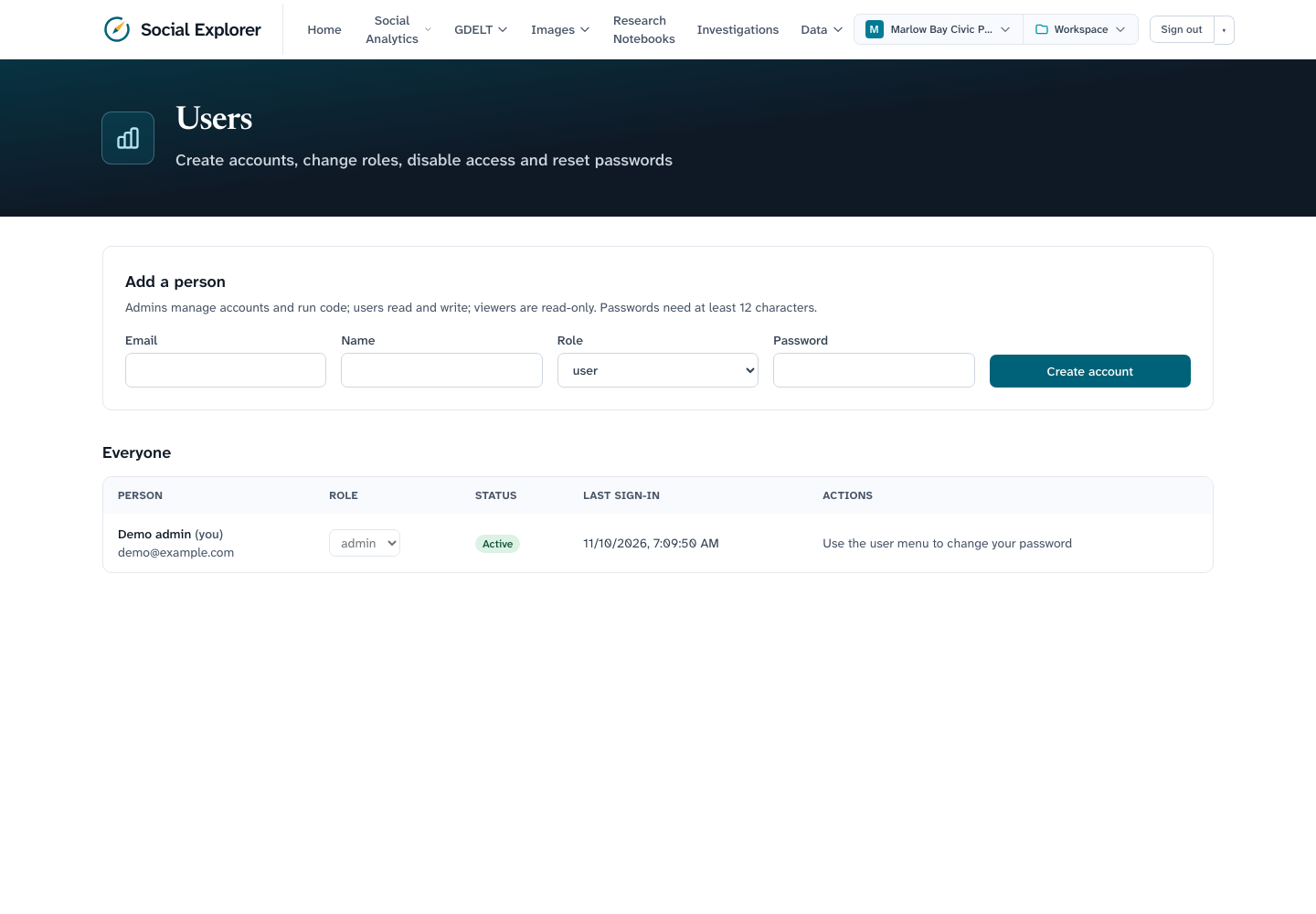
From there an admin can:
- Add a person with an email, name, role and a starting password (12 or more characters). Give them the password; they change it after signing in.
- Change a role. The person's sessions end, so the new role applies at once.
- Disable or enable an account. A disabled person cannot sign in and is signed out everywhere. Accounts are disabled, not deleted, so history such as who created a workflow stays attributable. A disabled account looks like a wrong password at sign-in.
- Reset a password. The person's sessions end.
You cannot change your own role, disable yourself or reset your own password from this page, and the last active admin cannot be demoted or disabled, so the install cannot lock itself out (changes to admins take turns, so two made at the same moment cannot both pass that check). The same actions are available as GET/POST /api/users and PATCH /api/users/<id>, for admins only.
Changing your password
Every role, including viewers, can change their own password from the user menu: enter the current password and a new one. Wrong guesses at the current password are throttled like sign-in. Your other devices are signed out and this one stays signed in.
Request limits and page security
- API rate limit. Each signed-in person may make 1200
/api/*requests a minute, across all their tabs and devices. Beyond that the server answers429withRetry-After. Pages,/api/healthand requests that are not signed in are not counted (not-signed-in requests are refused cheaply, and sign-in has its own per-address and per-account limits). Change it withAPI_RATE_LIMIT_PER_MINUTE(0turns it off). It stops a runaway script, not a distributed flood, and each server process counts separately. - Content-Security-Policy. Pages are served with a policy that runs scripts only from the site itself (the framework's inline scripts carry a per-response nonce), allows no
eval, lets pages call only their own server, and blocks plugins, framing by other sites and form posts elsewhere. Images and media may come from anyhttpssite (map tiles, post images, radio streams), which means a page that were somehow tricked into showing attacker markup could still leak data through an image request; scripts andfetchcalls cannot. The Jupyter page may frame the Jupyter server (anyhttporhttpsaddress, since its address is configurable). A reverse proxy must not strip or replace this header.
Current limitations
- Roles are global. Project membership limits who can see a project, but there is no per-project role: everyone in a project has the rights of their global role (only the creator and admins manage the team or delete the project).
- The sign-in throttle lives in memory, per server process. Behind several replicas each keeps its own count.
- There is no password reset by email and no single sign-on; an admin resets passwords.
- The rate limit, like the sign-in throttle, is per server process.
These are tracked in issue #65.